

Description
Overview
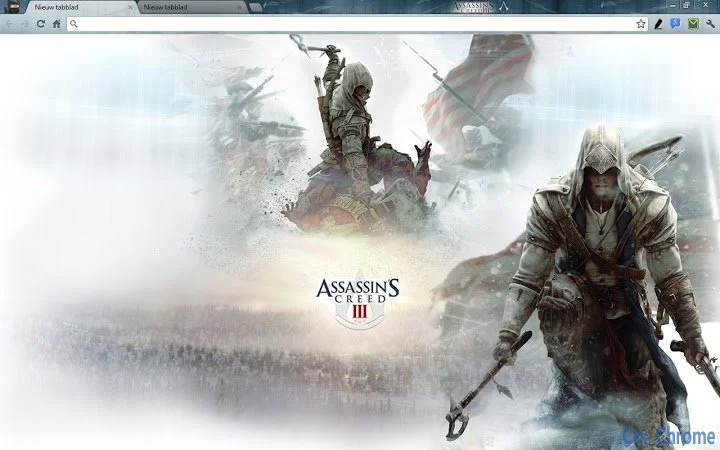
The Assassin's Creed 3 Browser Theme for Chrome is a desktop utility designed to personalize the browsing environment with a distinctive visual identity inspired by the iconic game series. This theme transforms the appearance of the Chrome browser, aligning it with the historical and thematic elements of the American Revolution era featured in Assassin's Creed 3. It serves as a digital aesthetic enhancement for fans of the franchise who wish to immerse themselves in the game’s atmosphere while using their web browser.
Target users include casual gamers, fans of the Assassin’s Creed series, and individuals who value a customized browsing experience. The theme is particularly suited for those who appreciate historical settings and immersive visuals in their digital tools. It is intended for use on Windows and Mac platforms, offering a seamless integration with Chrome’s interface without requiring additional software or complex setup.
While the developer has not provided detailed background information, the theme appears to be created for entertainment and personalization purposes. Real-world usage scenarios include using the browser during gaming breaks, browsing game-related content, or simply enjoying a thematic desktop environment that reflects the game’s visual style.
Key Features & Capabilities
- Thematic Visual Design – The theme features artwork and color schemes inspired by Assassin's Creed 3, including revolutionary-era motifs, iconic symbols from the game, and period-accurate textures.
- Chrome Browser Integration – Fully compatible with Google Chrome, allowing instant application to the browser’s new tab page, toolbar, and overall interface.
- Lightweight Performance – Designed as a minimal utility, it consumes negligible system resources, ensuring no impact on browser speed or stability.
- Easy Installation – Users can apply the theme with a single click through the Chrome Web Store or via the provided link, requiring no technical expertise.
- Non-Interactive Elements – The theme enhances appearance only; it does not alter browser functionality or collect user data.
These features allow users to create a consistent visual experience across their browsing sessions. For example, opening a new tab displays a themed background that reflects the game’s setting, helping users stay engaged with the narrative and aesthetic of Assassin’s Creed 3. The theme is ideal for fans who want to extend their gaming experience beyond gameplay into everyday digital interactions.
User Interface, Workflow & Performance
The user interface of the Assassin's Creed 3 Browser Theme is minimal and focused solely on visual presentation. It integrates directly into Chrome’s existing UI, modifying only the appearance of the new tab page, toolbar, and address bar. Navigation remains unchanged, preserving the standard workflow users are accustomed to.
Installation and activation are straightforward, requiring no configuration steps. Once applied, the theme takes effect immediately, with no noticeable delay or performance degradation. The developer did not specify resource usage details, but based on standard browser theme behavior, it operates with minimal CPU and RAM consumption.
Stability is maintained through Chrome’s built-in theme management system, which ensures compatibility and safe handling of visual assets. There are no reported issues with crashes or conflicts, and the theme does not interfere with other extensions or browser functions. Performance observations are based on general software behavior patterns.
Compatibility & System Requirements
The theme is compatible with both Windows and Mac operating systems, supporting current and recent versions of Google Chrome. It is designed specifically for desktop use and does not require any additional software or plugins.
Installation size is not specified by the developer. Exact system requirements were not listed. Compatibility information was partially provided, indicating that the theme is intended for Chrome-based browsers on desktop platforms.
Pros and Cons
Pros
- Visually immersive design inspired by a popular game series
- Simple one-click installation and application
- Lightweight with no impact on browser performance
- Safe and secure, with no data collection or tracking
- Available at no cost, making it accessible to all users
Cons
- Provides only visual customization, no functional enhancements
- Limited to Chrome browser; not compatible with other browsers
- Thematic content may not appeal to users outside the game’s fanbase
- No option for customization beyond the default theme
- Updates depend on Chrome Web Store or external link; no automatic update system
FAQ Section
Is the Assassin's Creed 3 Browser Theme free to use?
Yes, the theme is available at no cost. There are no subscription fees or hidden charges associated with its use.
Can I use this theme on browsers other than Chrome?
Currently, the theme is designed exclusively for Google Chrome. It is not compatible with other browsers such as Firefox, Edge, or Safari.
Does this theme collect any personal data?
No, the theme does not collect or transmit any user data. It is a static visual enhancement with no tracking or monitoring capabilities.
How do I install the theme?
You can install the theme by visiting the provided link. Once on the Chrome Web Store page, click “Add to Chrome” to apply the theme instantly.
Will this theme slow down my browser?
Not likely. As a lightweight visual tool, it consumes minimal system resources and is designed to operate without affecting browser speed or stability.
Final Thoughts + CTA
The Assassin's Creed 3 Browser Theme for Chrome delivers a focused, high-impact visual experience tailored to fans of the game series. While it does not offer functional upgrades, its immersive design and seamless integration with Chrome make it a compelling choice for users who value aesthetic consistency across their digital environment. Its free availability, ease of use, and secure operation further enhance its appeal.
Although limited in scope, the theme excels in its intended purpose: transforming the browser into a thematic extension of the game world. It is ideal for enthusiasts seeking a deeper connection to the Assassin’s Creed universe during their daily browsing.
Download Assassin's Creed 3 Browser Theme for Chrome now
Guides & Tutorials for Assassin's Creed III Theme for Chrome
How to install Assassin's Creed III Theme for Chrome
- Click the Preview / Download button above.
- Once redirected, accept the terms and click Install.
- Wait for the Assassin's Creed III Theme for Chrome download to finish on your device.
How to use Assassin's Creed III Theme for Chrome
This software is primarily used for its core features described above. Open the app after installation to explore its capabilities.
User Reviews for Assassin's Creed III Theme for Chrome 0
No reviews found





